
PAS · EM133-XM data and event logs
Data Log 3: reserve a recorder for a defined question
Narrated tour
Download MP4 · SRT captions · Use the video controls for captions and fullscreen; Escape returns to this lesson.
Your choice is remembered in this browser. Only available recordings can be selected. Changing version pauses the video and returns to the start. This choice applies to the lesson video, not a separate Short.
Playing version: Michael · en-AU · Australian.
Current complete Australian edition.
Available and planned versions
- Michael · en-AU · Australian — available
- Charlotte · en-US · American — planned; recording not available
- Spanish narration · es · To be selected — planned; recording not available
- US English narration · en-US · US — planned; recording not available
About this recording
Edited saved offline settings inspection. No configuration sent or accepted meter change claimed. Full recorded PAS frame, Site Tree and clock retained. No full-screen cards or manual inserts. Closing Site Tree tip uses separate edited saved-site views from a wider EM133-XM capture.
Michael (Australian) narration from ElevenLabs. Edited PAS screen recording.
Chapters
Data Log 3 is another separately configured conventional XM file. Use it to answer a defined measurement-history question rather than duplicating an existing file without understanding the additional memory use.
Australian narrated walkthrough with written guidance.
Before you start
- Use the intended EM133-XM site and verify its model, connection and firmware before treating settings as live.
- Complete the existing Upload and verify your logs before changing memory lesson before any operation that can alter or remove retained records. Upload Setups and Upload Logs preserve different information.
Start with the question
The XM file and parameter tables include Data Log 3 separately from Data Logs 1 and 2. Conventional files can hold selected supported measured parameters and can be triggered through the setpoint system.
ILLUSTRATIVE use: a dedicated file could retain selected operating quantities for a particular investigation or a separate periodic cadence. Calling it a diagnostic log describes your chosen use, not a fixed factory function.
Keep the field selection focused
More columns are not automatically a better investigation. Select the quantities that answer the question and retain their meaning and units.
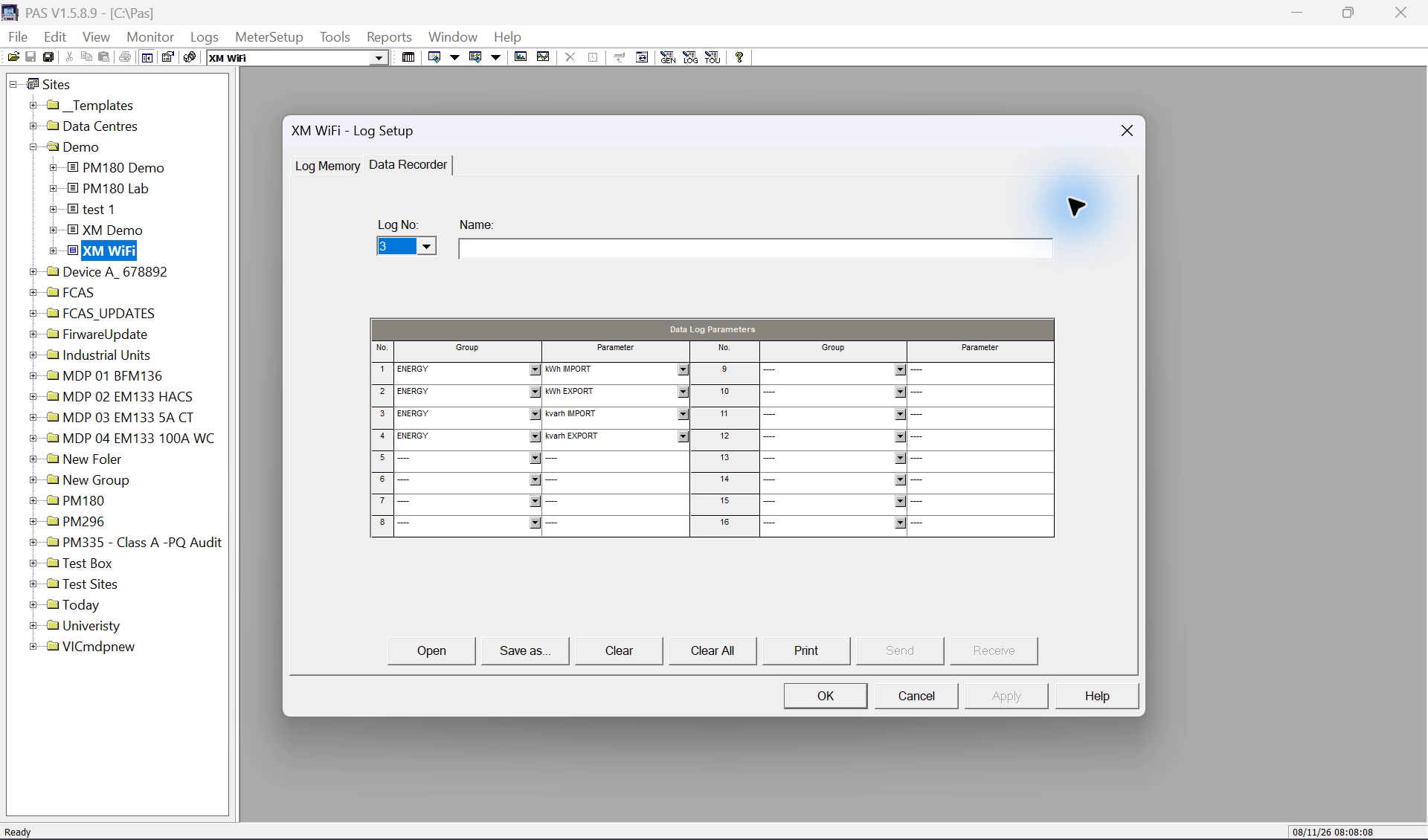
The XM datasheet allows up to 16 parameters/channels for interval recording. Check this file’s allocated parameter count and selected rows. Those values share one record; the file’s Number of Records and recording cadence determine how much history can be retained. After inspecting the fields, return to Log Memory and read this file’s allocation.
Inspect Log No. 3
Open MeterSetup > Memory/Log > Data Recorder and choose Log No. 3. Read the current name and parameter rows before making a proposed change.
Keep the Site Tree visible and expand the selected site with + if needed; confirm the site and log number before proceeding.
Describe the intended record
List the question, selected quantities, units and intended trigger in the plan. Distinguish measured power, demand values and cumulative energy rather than mixing their interpretations.
Check allocation and overwrite behaviour
Inspect the Data Log 3 partition in Log Memory. Check record capacity and wrap-around/non-wrap behaviour and keep a verified archive before any reallocation or clear.
Explain conditional recording without inventing a threshold
Conventional data recording may be requested by a setpoint event as well as a time-based trigger. A conditional example can retain selected quantities when a reviewed condition operates; it is not the same as continuous high-speed waveform capture.
For an analogue trigger, the operate and release limits define the operating condition and hysteresis, with delays affecting when operation/release occurs. Thresholds and delays must come from the application; this lesson does not provide an arbitrary live alarm setting.
Do not force a relay or reset action to create a demonstration. Check the actual supported Data Log 3 destination and preserve existing control functions.
Resolve the destination and test its actual behaviour
In the installed example, the offline PAS demonstration shows DATA LOG #3 in General Setup > Control/Alarm Setpoints > Action. This is the intended destination label for the reviewed Data Log 3 plan, not evidence that the connected meter is configured to use it.
The XM guide documents the file and its contents, but its older action table does not fully enumerate the additional XM destinations. No undocumented numeric action code is supplied. Check the actual installed model/PAS combination and obtain clarification if the destination is absent.
For an authorised implementation, read back the chosen trigger, limits, delays and destination. Test under a controlled, agreed condition and retrieve the resulting file. Do not assume a record will repeat continuously while a condition remains true; inspect actual timestamps and the documented setpoint transition behaviour.
Count all sources of records
When several setpoints can write into one file, include them in retention planning. A simple periodic-record estimate is insufficient if additional conditional records are also generated.
Upload Data Log 3 separately, inspect timestamps and selected values, and compare with Event Log evidence where relevant. A time correlation is evidence to investigate, not proof that one event caused every observed change. Preserve the configuration and the pre-change archive with the investigation.
Limits and checks
- The written procedure is not evidence that a live setting was changed or that new records were generated. Check the selected device, firmware and current readback.
- The captured action label is verified only for PAS 1.5.8.9 with the offline saved XM site. Live acceptance, configured triggers and generated records still require device readback. The old protocol action-table omission remains unresolved; no raw action code is inferred.
Check your understanding
Is Data Log 3 inherently an alarm or waveform recorder?
May an arbitrary threshold be used on a live installation to make a video?
Sources
- Source 1. EM133 / EM133-XM Modbus Reference — log organisation and XM files (opens in a new tab)
BG0640 Rev. A1, printed/PDF pages 14–16 and 63–64
The file-setup table explicitly includes XM Data Logs 2 and 3; older generic file-ID/action tables are incomplete for these files.
- Source 2. EM13x Installation and Operation Manual — data recorder (opens in a new tab)
Printed pages 122–124 / PDF pages 125–127, section 5.5.3–5.5.4
General recorder procedure and documented base-family defaults; not evidence of the selected XM site's current settings or universal capacity.
- Source 3. EM13x Installation and Operation Manual — setpoints (opens in a new tab)
Printed pages 106–108 / PDF pages 109–111; interval/action tables printed 171–172 / PDF 174–175
Trigger, operate/release and action semantics; exact XM destination choices must be checked in the installed PAS version.
- Source 4. EM13x Installation and Operation Manual — memory allocation (opens in a new tab)
Printed pages 119–121 / PDF pages 122–124, section 5.5
Model and firmware limits remain applicable.
- Source 5. PAS Getting Started — upload and open log files (opens in a new tab)
BG0337 Rev. A2, printed/PDF pages 21–22 and 25; configuration upload page 10
Model and firmware limits remain applicable.
- Source 6. PAS 1.5.8.9 – offline XM action choices (opens in a new tab)
Full-window frame from XM-log-tour01.mp4 at 00:03:55; PAS clock 8 November 2026, 08:10:18
Shows DATA LOG #1, DATA LOG #2, DATA LOG #3 and EVENT LOG in this installed PAS offline saved-site action list. It does not establish current meter settings, active actions or universal firmware support.
- Source 7. EM133-XM datasheet — interval recording capacity (opens in a new tab)
TBV1.1, PDF page 2, Event and Interval Data Recording
XM-specific datasheet lists up to 16 parameters/channels. Older family and unified-protocol tables list nine; confirm the selected model, firmware and PAS allocation before changing a file.
Revision and review details
| Revision | Change and reason | Review / supersedes |
|---|---|---|
| 20261108-video-v4 8 November 2026 | Revised teaching video, captions and chapter timing. Show the menu and relevant setup screens clearly, with spoken guidance and pauses. | Final export checked before development deployment. 20261108-retention-v3 |
| 20261108-draft-v1 8 November 2026 | Added a detailed model-scoped log lesson with source references and learner checks. Added a hashed original PAS frame verifying the installed action labels with an offline-only qualification. Explain each log's purpose, PAS controls and interpretation without assigning invented factory roles. | Manufacturer source review complete; independent verification pending. None |
| 20261108-retention-v2 8 November 2026 | Clarified parameters per record, per-file allocation and retention; added sequential log navigation and manual-reference guidance where relevant. Connect the displayed recorder settings with practical memory planning. | Manufacturer-source review completed; no new footage or live changes claimed. 20261108-draft-v1 |
| 20261108-retention-v3 8 November 2026 | Added a Charlotte narrated mini-lesson with moving PAS navigation, captions, chapter controls and Site Tree expansion. Connect recorder contents to memory allocation and make the steps visible. | Export decoded and visual checks recorded; final independent review accompanies the deployment record. 20261108-retention-v2 |