
PAS · EM133-XM memory and interval logging
Plan memory partitions and retained history
Plan retained history from the allocation reported for the selected meter. Total memory, free memory, record size and the number of allocated records describe different things. Before applying any partition change, complete the Upload and verify your logs lesson and keep its checked archive.
Source-reviewed draft; live reconfiguration and recording release pending.
Before you start
- Complete the configuration backup and historical-log upload, then reopen and verify the required archive.
- Identify the exact model and firmware. A saved offline site can show old settings and is not current device readback.
- Agree which logs, quantities, recording rates and retention period the application needs.
Read the current allocation
Memory is allocated to log files. The record limit determines how many records a file can hold; the recording rate determines how quickly those slots are used. Additional XM data-log entries must be checked on the selected unit.
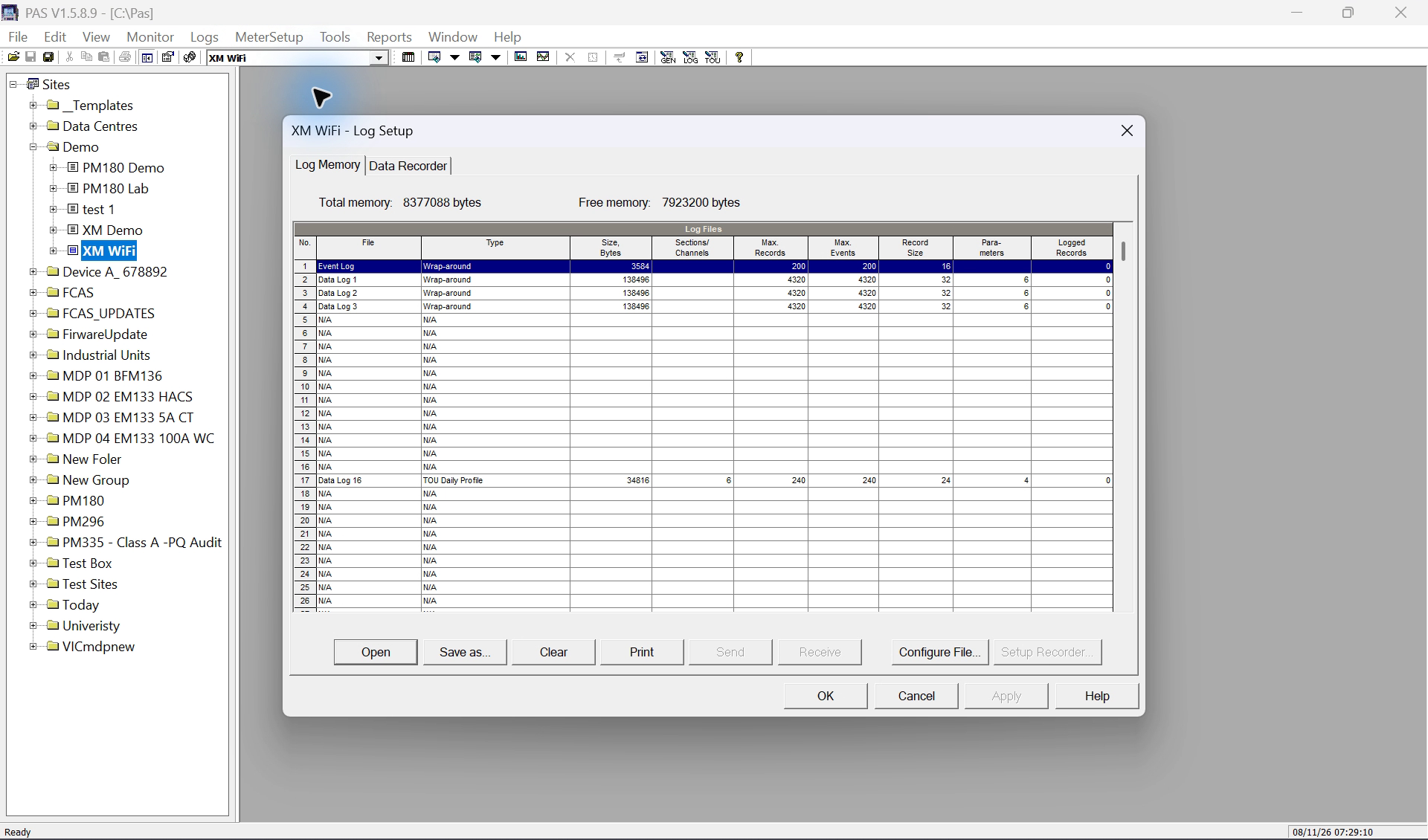
First inspect Data Log 1, then 2, then 3 in Data Recorder. Each file has its own parameter list. Return to Log Memory to connect those contents with each file’s allocation: parameters describe the columns in one record; Number of Records describes how many timestamped records the file can retain.
Open Log Memory
Open MeterSetup > Memory/Log and select Log Memory. For a connected check, receive the current settings from the intended meter before treating the displayed values as live.
Keep PAS maximised with the full Site Tree and clock visible. If the meter branch is collapsed, expand its + control so the selected site remains easy to identify; use the menu route first.
Record the starting state
Note Total and Free memory, each allocated file, its type, number of records, number of parameters and reported record size. Preserve the starting configuration with the archive.
Separate file purposes
Keep Event Log history, conventional interval data and the daily Billing/TOU profile distinct. The daily profile is not a substitute for a conventional interval log.
Separate data points from stored records
The EM133-XM datasheet specifies interval recording for up to 16 user-selected parameters or channels. These are the values stored together in a record, not 16 separate records each time the logger runs. Check the selected file’s allocated parameter count and available PAS rows before editing.
For example, a record containing voltage, current and active power contains three data points at one recording time. At one record every 15 minutes, it uses 96 record slots per day, not 288. Adding fields can increase the record size and the memory needed for that allocation.
Older EM13x and unified-protocol tables show nine parameters. Use the XM-specific specification and confirm the actual model, firmware and allocation; do not copy the older limit or a memory-size formula across versions.
Decide what happens when the file fills
The manufacturer's file type controls whether recording overwrites old data or stops at capacity. Choose it deliberately and plan uploads around that behaviour.
FIFO means first in, first out: in a circular or wrap-around file, the oldest record is replaced as new records arrive after capacity is reached. This explanation applies to wrap-around recording. A non-wrap file stops when full. Clearing a file or changing its partition is a separate operation, not normal FIFO turnover.
| File type | When the allocated file fills | Operational consequence |
|---|---|---|
| Wrap-around | New records replace the oldest records. | Retrieve records before the required history is overwritten. |
| Non-wrap | Recording stops until the file is cleared. | Monitor remaining capacity and archive before an authorised clear. |
Estimate retention from record slots
Teaching example: assume one record at each scheduled interval, no additional event-triggered records and a constant interval. Records per day = 1440 ÷ interval in minutes. Retained days = allocated record slots ÷ records per day.
The example below assumes 1440 allocated record slots. It is not a measured capacity or factory default for the connected meter. Use its actual allocation for a site calculation.
For the hourly and daily examples, assume one conventional record per hour or day. A Billing/TOU daily profile has a different multi-section structure, so do not use this table to infer its byte allocation. The Event Log is event-driven: its retention depends on the rate of recorded events.
Calculate each file separately. Use PAS’s reported record size and allocated record count; there is no universal conversion from a headline memory size in MB to retained days. Additional event-triggered records reduce the simple periodic estimate.
| Illustrative interval | Estimated records per day | Estimated retention with 1440 slots |
|---|---|---|
| 5 minutes | 288 | 5 days |
| 15 minutes | 96 | 15 days |
| 30 minutes | 48 | 30 days |
| 1 hour | 24 | 60 days |
| 1 day | 1 | 1440 days |
Configure the file and its recorded contents
Treat deletion, clearing and partition changes as potentially destructive. Do not proceed until the required archive has been reopened and verified. Use a disposable offline copy to practise the dialog before an authorised live change.
Open the intended file partition
In Log Memory, double-click the intended file. Inspect File Type, Number of Records and Number of Parameters. Use the displayed record size and available capacity when planning the allocation.
Review any affected history
Read the exact warning and affected-file list before accepting a change. Delete removes a partition; a log-clear command removes retained records from its selected target. Do not add a Clear All Log Files operation unless it is independently required and authorised.
Choose the recorded parameters
Select the file row and Setup Recorder, or open the Data Recorder tab and choose the corresponding log. Configure the fields within the allocated parameter count and give the log a clear name.
Save, send and read back deliberately
Saving a local setup and sending it to the meter are separate steps. For an authorised live change, send only the intended setup, receive it again and compare the allocation and recorder contents with the plan.
Check recording resumes as intended
After the appropriate recording trigger, upload new records and verify their timestamps, fields and units. Check relevant Event Log entries. Keep the pre-change archive separate from the new configuration's records.
Pro tips after the menu workflow
At the same record capacity, a shorter logging interval retains less time. Extra setpoints recording to the same file also consume record slots and reduce the simple periodic estimate.
Choose only the parameters needed for the task, then check the reported record size and capacity again. Do not rely on a generic memory-size headline to promise a fixed number of days.
Schedule uploads comfortably inside the verified retention window and check successful archive results. A configured schedule alone is not evidence that an upload ran.
Limits and checks
- The base EM13x manual and XM material differ in capacity and file count. This lesson deliberately gives no universal XM memory-capacity guarantee.
- The base manual's record-size screenshot, formula and factory retention table conflict. Use actual PAS-reported allocation and seek product-specific clarification rather than applying those inconsistent totals.
- The local PAS training inspection on 8 November 2026 was offline. It confirmed available screens and controls, not the present contents or capacity of the connected meter. No partition was sent or memory cleared.
- The reviewed sources do not prove that every partition edit clears every file. The archive-first rule protects against the data-loss risk without asserting an unverified universal erase behaviour.
Check your understanding
Does selecting wrap-around preserve all old records indefinitely?
Can the base EM13x manual's memory size be used as the XM meter's confirmed capacity?
In the illustrative exercise, what happens when the interval changes from fifteen minutes to five minutes without changing record capacity?
Does one record with 16 selected values consume 16 record slots?
Sources
- Source 1. EM13x Installation and Operation Manual — configuring recorders (opens in a new tab)
Printed pages 119–124 / PDF pages 122–127, section 5.5, Figures 5-19 and 5-20
General family procedure only: base-model capacity, factory record-size examples and retention totals must not be assumed for XM.
- Source 2. EM133 / EM133-XM Modbus Reference — allocation and file setup (opens in a new tab)
Printed/PDF pages 14–15, section 2.10.1; page 63, File Setup; page 77, File Attributes
Supports static allocation, circular behaviour, XM-specific file entries and reported record/file sizes; use actual device readback for capacity.
- Source 3. PAS Getting Started — setup and log uploads (opens in a new tab)
Printed/PDF page 10, section 3.3; pages 21–22, section 6.1
Configuration and historical-data uploads are separate operations.
- Source 4. EM13x Installation and Operation Manual — reset targets (opens in a new tab)
Printed pages 130–131 / PDF pages 133–134, section 6.1 and Figure 6-1
Distinct log, energy, demand and counter clearing commands; no universal pre-repartition clear-all requirement established.
- Source 5. EM133-XM datasheet — interval recording capacity (opens in a new tab)
TBV1.1, PDF page 2, Event and Interval Data Recording
XM-specific datasheet lists up to 16 parameters/channels. Older family and unified-protocol tables list nine; confirm the selected model, firmware and PAS allocation before changing a file.
Revision and review details
| Revision | Change and reason | Review / supersedes |
|---|---|---|
| 20261108-draft-v1 8 November 2026 | Added partition planning, full-file behaviour and conditional retention exercises. Teach allocation and backup consequences without applying base-model factory figures to XM. | Manufacturer source review complete; live partition change and recording release pending. None |
| 20261108-retention-v2 8 November 2026 | Clarified parameters per record, per-file allocation and retention; added sequential log navigation and manual-reference guidance where relevant. Connect the displayed recorder settings with practical memory planning. | Manufacturer-source review completed; no new footage or live changes claimed. 20261108-draft-v1 |