
EM133-XM · IDENTIFY
How do I identify an Australian EM133-XM?
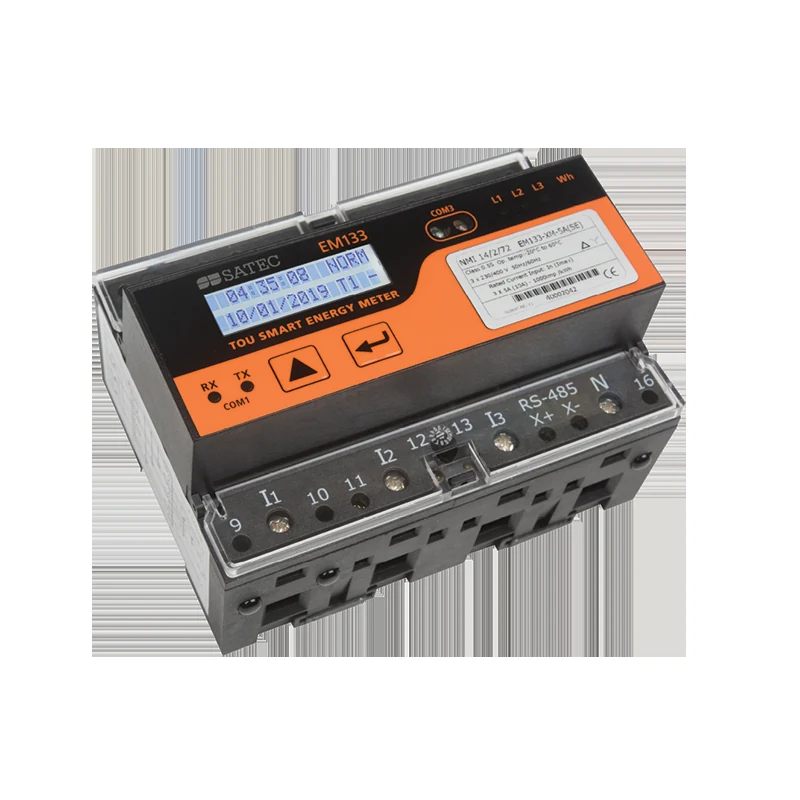
The EM13x family manual covers several models: the EM132 and the plain EM133 (EM133, EM133-21DC and EM133-SE). It does not name the EM133-XM. SATEC Australia's advice: before you follow a procedure or ask for support, confirm that your meter is an EM133-XM and record the details on this page.
Check the label first
The SATEC Australia datasheet gives the model name as EM133-XM, and its order code begins EM133-XM. SATEC Australia's advice: check that the label on your meter shows EM133-XM. If the label is worn, missing or shows a different model, treat the model as unknown and contact us with photographs before following any model-specific instruction.
The datasheet describes the XM as "the enhancement of SATEC's discontinued AR model". SATEC sources name that model differently: the SATEC support documents page lists an "EM133-AR Modbus Communications Protocol Reference Guide (discontinued)", while Can I replace the clock backup battery in an EM133? refers to the "EM133-XM-AR". SATEC Australia's advice: if your meter is marked as an AR model under either name, don't assume it shares the XM's documents or answers; contact us.
Read the order code
The SATEC Australia EM133-XM datasheet gives the order code in this form:
EM133-XM - CURR. - 50HZ - SE - CC
| Part of the code | What the datasheet lists |
|---|---|
| CURR. | 5 Ampere (CT operated); Direct current measurement up to 100A; HACS |
| 50HZ | 50Hz or 400Hz calibration frequency |
| SE | Self energised / powered |
SATEC Australia's advice: copy the whole order code exactly as it appears on your meter or order paperwork, including any letters after SE.
The datasheet lists three current input options: 5 A/10 A (CT operated), direct connect up to 100 A, and the HACS remote sensor.
The datasheet says expansion modules are ordered separately, with a maximum of one per instrument. Its list includes digital input and output modules, analogue output modules, and Ethernet and RS232/422/485 communication modules. SATEC Australia's advice: note any module fitted to your meter. A module listed in the datasheet is not proof that your meter has one.
Record the serial number and software version
The EM13x manual's Device Info display (section 3.3.7) shows meter identification information: the serial number (S/N) and device software version (S/W), the boot software version, and communication port information.
SATEC Australia's advice:
- Write down the S/N and S/W exactly as your meter shows them. The values in the manual's example screen are not your meter's values.
- Read them from the meter itself. A site saved in PAS on a computer is not a record of what is in the meter today.
The firmware table in the EM13x manual lists firmware versions V12.02.xx, V12.05.xx, V12.06.xx, V12.07.xx, V12.08.xx, V12.22.xx and V12.28.xx.
Use the right documents
- EM133-XM datasheet: SATEC Australia's datasheet, revision TBV1.1, dated 6 October 2026.
- EM133-XM Modbus Communications Protocol Reference Guide.
The datasheet and the Modbus guide are on the SATEC support documents page for the EM133-XM.
The EM13x Series Installation and Operation Manual (BG0491) is the family manual. It does not name the EM133-XM. The SATEC support documents page lists it as the EM132 Smart Meter Installation & Operation Manual. SATEC Australia's advice: where the answer must be specific to the EM133-XM, check with us before relying on the family manual.
For a guided tour of the EM133-XM setup screens in PAS, see Explore the EM133-XM setup options in PAS.
Can I replace the clock backup battery in an EM133? states that it does not cover the EM133-XM. SATEC Australia's advice: don't apply an article written for another EM13x model to the EM133-XM unless it says it covers the XM.
Clock backup battery and seals
The EM133-XM datasheet lists a real-time clock "With backup battery" and "Low battery indication". The EM133-XM datasheet and Modbus guide give no battery replacement procedure.
SATEC Australia's advice: don't open the meter, and don't remove or disturb any seals or marks on it. If the clock is wrong or the meter reports a low battery, contact us with the details below.
What to send SATEC Australia support
SATEC Australia's advice: include these with your enquiry:
- a clear photograph of the meter label;
- the full order code;
- the S/N and S/W from the Device Info display;
- the current input type: 5 A, 100 A direct or HACS (and the sensor model, for HACS);
- any expansion module fitted;
- what you are trying to do, or what the meter is showing.
Contact SATEC Australia technical support through our contact form.
Source review: 22 November 2026.