
EM132 · IDENTIFY
Which EM132 model and input variant do I have?
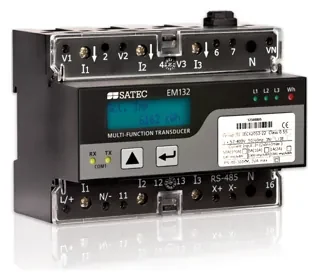
Quick Answer
An EM132's full ordering code identifies the choices made when it was ordered: model, current input, calibration frequency, resolution, power supply, mechanical seal, electronic seal, protocol, and testing and certificate. SATEC Australia's advice is to find that code in the purchase order, quotation or delivery documents, and to photograph the meter's label as well. The meter's own front display shows its serial number and firmware version, but not its input variant.
The manual's model list describes each current input as either a transformer-operated or a direct-connection configuration, and lists the auxiliary power supply options separately.
Is It An EM132, An EM132-TP Or Another EM13x Model?
The EM132 datasheets list two models:
| Code | Model |
|---|---|
| EM132 | Multi-function transducer |
| EM132-TP | EM132 with two integral RS-485 ports, AC/DC power supply only |
The EM132 shares the EM13X Series Installation and Operation Manual with the EM133. The manual's measurement tables are headed for the EM133, and its label pictures are all EM133 labels. SATEC Australia's advice is not to use EM133 or EM133-XM ordering codes, labels or features to identify an EM132.
Reading The Ordering Code
The datasheet order string reads, from left to right: model, current input, calibration frequency, resolution, power supply, mechanical seal, electronic seal and protocol. Both datasheets add a testing and certificate choice.
| Segment | Codes | Meaning |
|---|---|---|
| Current input | 5 | 5 A |
| 1 | 1 A | |
| 63 | Direct current measurement up to 63 A (50/60 Hz only) | |
| 100 | Direct current measurement up to 100 A, up to 55 °C ambient (50/60 Hz only) | |
| RS5 | 5 A split-core remote High Accuracy Current Sensor (50/60 Hz only) | |
| HACS | High Accuracy Current Sensors (50/60 Hz only; three HACS required) | |
| HACS-SPDR | High Accuracy Current Sensors with wires | |
| Calibration frequency | 25HZ, 50HZ, 60HZ, 400HZ | 25 Hz and 400 Hz support the 1 A and 5 A models only |
| Resolution | - | Low resolution, 1 A and 1 V |
| H | High resolution, 0.01 A and 0.1 V | |
| Power supply | ACDC | 40–300 V AC/DC |
| SE | Self-energised from the measured voltages, 120–277 V L-N, 50/60 Hz models only; not for EM132-TP | |
| 21DC | 12 V/24 V DC; not for EM132-TP | |
| Mechanical seal | - or S | Standard or special seal |
| Electronic seal | - or P | Energy register accessible, or protected |
| Protocol | - | Modbus and DNP 3.0 |
| 870 | Modbus and IEC 60870-5-101/104 | |
| Testing and certificate | - | Full functional test, calibration at various work loads and detailed test report |
| CC | All of the above, plus an ISO 17025 and ILAC certified calibration certificate |
The datasheet notes that the IEC 60870-5-104 option requires Ethernet, is not compatible with the AR version and does not work over a cellular network.
Expansion Modules
An EM132 can carry at most one expansion module, which can be ordered separately. The datasheets list analogue output modules (AO codes), communication modules (Ethernet, Profibus, RS-232, RS-232/422/485 and CAT-M/LTE modem) and digital I/O modules (4 DI with 2 relay or 2 SSR outputs, 8 DI, and the 12 DI/4 relay module).
The base order string has no segment for the module. SATEC Australia's advice is to check the purchase records for which module, if any, was supplied. What a particular meter can do also depends on its firmware and configuration, not only on its ordering code.
What The Meter Itself Tells You
On the front panel, the device info display shows the serial number, the device software (firmware) version, the boot version and the communication port settings. SATEC Australia's advice is to record these exactly as shown. They identify the unit to SATEC Australia but do not state its input variant.
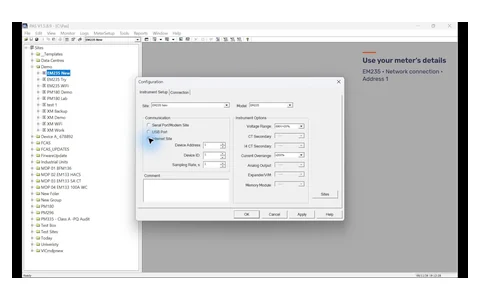
When you create an EM13x site in PAS, the manual says to select "EM13X Series" in the Model box; "PAS automatically selects the appropriate instrument options for your meter", and you then select the CT secondary (5 A or 1 A). The manual's site set-up step does not identify the input variant. SATEC Australia's advice: for current-input codes 5 and 1, select the matching CT secondary. For codes 63, 100, RS5, HACS and HACS-SPDR the ordering code does not give a 5 A or 1 A secondary, so contact SATEC Australia before setting up the PAS site.
Where The Manual And Datasheets Differ
The manual and the current datasheets do not describe the EM132 identically. These points are unresolved:
- Self-energised. The datasheets offer an SE (self-energised) power option for the EM132. The manual lists self-energised models only as EM133-SE.
- AC/DC supply range. The datasheets say 40–300 V AC/DC. The manual says 40–318 V AC/DC.
- DC supply range. The datasheets describe the 21DC option as 12 V/24 V DC. The manual gives the EM132/EM133-21DC supply as 9.5–36 V DC.
- Direct-input codes. The manual names the direct-connection variant "-50" (50 A nominal, 63 A maximum at 60 °C, 100 A at 55 °C). The datasheets use the codes 63 and 100. The sources do not say how -50 relates to those codes.
- EM132-TP. The datasheets list the EM132-TP. The manual does not mention it.
SATEC Australia's advice while these are open: treat the ordering code on your records as the reference, check the supply rating marked on the meter itself before connecting a supply, and contact SATEC Australia before installing or replacing a meter whose code or label does not match a row above.
What To Send If You Are Not Sure
Contact SATEC Australia technical support through our contact form. SATEC Australia's advice is to include:
- a clear photograph of the meter's label;
- the full ordering code from the purchase records, if you have it;
- the serial number and firmware version from the device info display;
- whether an expansion module is fitted, and its type if known.
Manuals And Source Pages
- EM132 Multi-Function Meter Datasheet, SATEC Australia, TBV1.0, 21 September 2026: ordering information pages 8–9. Open the datasheet in a new tab.
- EM132 Datasheet, SATEC Ltd, January 2025: order string page 7; testing and certificate and expansion modules page 8. Open the datasheet in a new tab.
- EM13X Series Installation and Operation Manual, BG0491. The cover shows Rev. A15, PDF page 2 is dated August 2024, and the footer on PDF page 4 says Rev. A16. Model list printed pages 10–11 / PDF pages 13–14; device info display printed page 77 / PDF page 80. Open the manual at the model list in a new tab.
- EM132 product page: EM132 multi-function meter.
Related Help
Source review: 22 November 2026.