
ETC ONE PLUS · SUITABILITY
Is an ETC One Plus gateway suitable for my network?
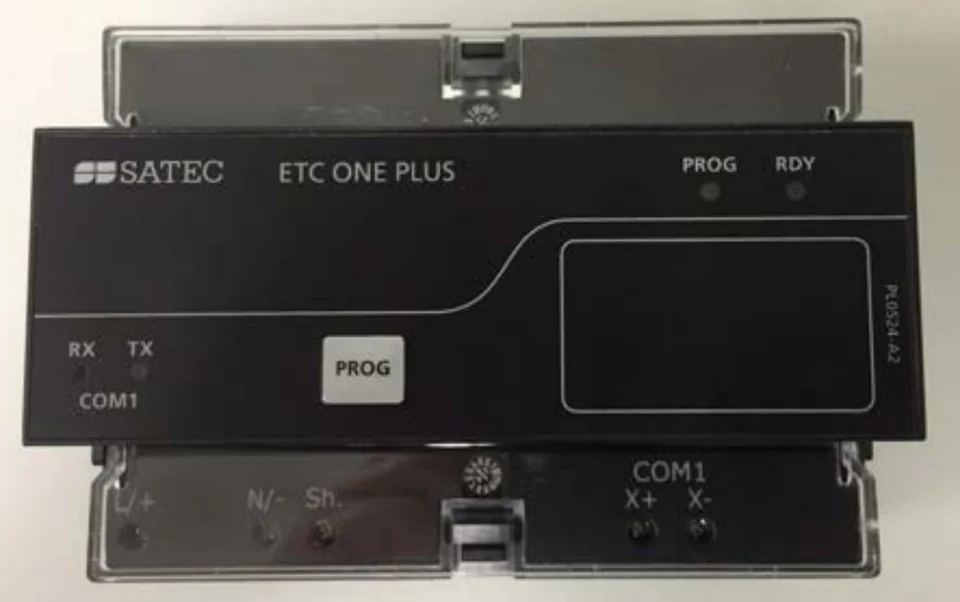
This page applies to the ETC One Plus network communicator described in manual BG0596 Rev. A2, which also calls it the ETC I.
The ETC II and ETC2002 are different products with their own manuals. SATEC Australia's advice: do not apply their documentation to the ETC One Plus.
The manual describes the ETC One Plus as a "Pass-through MODBUS gateway" that "connects multiple serial RS-485/422 devices to the Internet via a local Ethernet network or via public Cellular communication network".
SATEC Australia's advice: whether a particular unit suits your network depends on its supply variant, the module fitted to its COM2 port and its firmware. Read these from the unit, not from a catalogue.
What the manual documents
| Item | BG0596 Rev. A2 | Page |
|---|---|---|
| Downstream port | COM1, RS-485, "Modbus RTU, Master/Slave", baud rate "up to 115.2 kbps" | 31 |
| Meter addresses polled | "fixed address 1-31" | 27 |
| Gateway's own address | "32 or higher (99)" | 27 |
| COM2 options | "Ethernet 10/100BaseT", "CELLULAR – 2G/3G", "RS-232 or RS-422/485" | 9 |
| Ethernet and cellular protocol | "MODBUS/TCP (Port 502", "Number of simultaneous connections: 4" | 31 |
| Serial COM2 module protocol | "MODBUS RTU, Slave" | 31 |
| Mounting | "Table top, DIN Rail or wall-mounting options" | 5 |
| Expertpower | "an embedded eXpertPowerTM client"; "XPW Client Enabled" default NO | 21 |
What the manual does not document
The whole of BG0596 Rev. A2 was checked. It documents only Modbus RTU and Modbus/TCP. It does not describe stored or cached meter data, DNP3, M-Bus, BACnet or SATEC ASCII, a second downstream RS-485 line for meters (the optional COM2 RS-232/422-485 module is an upstream Modbus RTU slave port, pages 14 and 31), or an editable routing table. The only use of the words "data server" is on page 5, where COM2 is configured "to route data server to predefined MODBUS Slave devices".
SATEC Australia's advice: if your site needs any of the items above, more than 31 meter addresses behind one gateway, or more than four upstream TCP clients at once, ask SATEC before you choose this gateway.
Where SATEC documents disagree
| Topic | Source | Exact wording |
|---|---|---|
| Supply | Manual page 5 | "120/240V AC/DC or 12/24 VDC operation" |
| Supply | Manual page 30, AC/DC supply | "Rated input: 40-300VAC 50/60Hz, 40-300VDC, Burden 5VA" |
| Supply | Manual page 30, DC supply 12/24VDC | "Rated input: 9-36VDC" |
| Supply | Australian billing catalogue page 16 | "supplied from 85-265V AC/DC power supply" |
| Cellular | Manual page 9 | "CELLULAR – 2G/3G" |
| Cellular | SATEC Ltd product page, 22 November 2026 | "2G/3G/4G port" |
| Number of devices | Manual page 9 | "up to 32 devices" |
| Number of devices | SATEC Ltd product page | "supports up to 32 devices in serial communication in Modbus protocol" |
| Number of devices | Manual page 27 | "fixed address 1-31" |
The manual says to "check the label on the the device to ensure that it is equipped with the appropriate power supply".
SATEC Australia's advice: read the supply rating from the unit's label. Plan meter addresses within 1 to 31, and ask SATEC about address 32. The manual does not cover a 4G module, so for a cellular unit identify the exact module, get its documentation and confirm current service with your carrier.
Before you install or reuse a unit
These are the manual's default settings and warnings:
- COM1 defaults are 19.2 kbps and 8N, and the "7E data format should not be used with the Modbus RTU protocol".
- The factory default IP address is 192.168.0.203, and "Connecting a device with the factory-set IP address to the Ethernet network can disrupt communications if the IP address exists on the network."
- The time zone offset default is "-300 (Eastern Time)". Daylight saving is "disabled in the ETC ONE PLUS by default", and "The default daylight savings time change points are pre-set for the U.S.A."
- PAS can configure the gateway "via the Internet or locally (in Programming mode only)", and "In program-service mode, the Internet-to-serial gateway is not operational."
- "Upload Setups" copies the setup "from the ETC ONE PLUS to the site database". "Send" and "Download Setups" download setups to the device.
SATEC Australia's advice: before installing or reusing a unit, check and record the following.
- A nameplate photograph showing the supply rating, serial number and any part number.
- The COM2 module, from its label. An antenna in a photograph does not identify the cellular module.
- The firmware version.
- Each meter's model, Modbus address, baud rate and data format.
- An IP address agreed with the site's network owner.
- Every upstream client, keeping the total to four or fewer TCP connections.
- The time zone and daylight-saving settings the site needs, compared with what the unit holds.
- For a unit being reused, its existing setup, read into PAS with Upload Setups and saved as a dated copy.
SATEC Australia's advice: the ETC One Plus is a communications gateway, not a meter, and this page makes no metering or regulatory claim for it.
What to send SATEC
SATEC Australia's advice: to ask whether a unit suits your site, send the following.
- Nameplate and COM2 module photographs.
- The firmware version.
- The upstream system or systems and the protocol they use.
- The meter list with addresses.
- The cellular carrier, if you plan to use cellular.
- Whether the site needs any stored data.
SATEC Australia's advice: contact SATEC Australia technical support through our contact form.
For commissioning, wiring and the PAS setup screens, see How do I connect and configure a SATEC ETC gateway?.
Manual and page references
| Document | Revision | Pages used |
|---|---|---|
| ETC ONE PLUS Network Communicator Installation and Operation Manual | BG0596 Rev. A2 | 5, 9, 12, 14, 16, 18, 21–22, 24, 26–27, 30–31 |
| SATEC Billing & Revenue Metering Catalogue | undated | 16 |
| ETC One Plus product page, SATEC Ltd | read 22 November 2026 | — |
Printed page numbers match the PDF page numbers in the manual. The references were checked on 22 November 2026. No installed gateway was tested for this page.
Source review: 22 November 2026.