
ETC ONE PLUS · METER READS
What can I check when an ETC One Plus is online but meter reads fail?
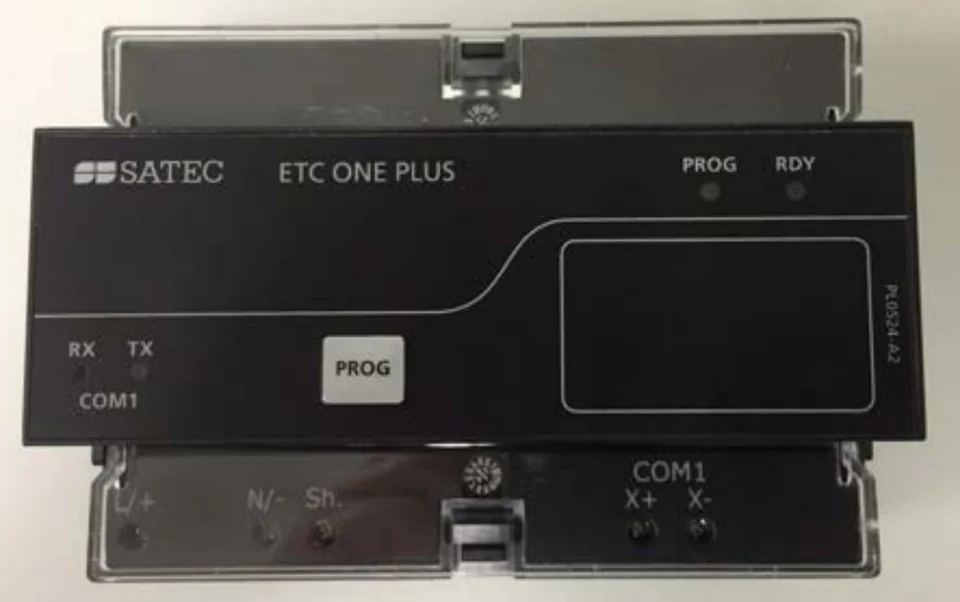
This page applies to the ETC One Plus network communicator described in manual BG0596 Rev. A2, which also calls it the ETC I.
SATEC Australia's advice: do not use ETC II or ETC2002 instructions for it. The ETC II and ETC2002 are different products with their own manuals.
For commissioning, wiring and the PAS setup screens, see How do I connect and configure a SATEC ETC gateway?.
How the gateway passes a read
The manual describes the ETC One Plus as a "Pass-through MODBUS gateway" that "will transfer data from/to ETHERNET or Cellular module to/from serial communication port COM1".
It provides "a TCP server for master client connections on the standard TCP ports: 502 (Modbus/TCP)", and "The TCP server supports four simultaneous client connections."
On routing, the manual says: "MODBUS Slave devices to be polled shall have fixed address 1-31, the ETC I MODBUS Master address shall be 32 or higher (99)."
SATEC Australia's advice: a gateway that answers on its network has not yet shown that any meter behind it can be read. Work through the read-only checks below before changing any setting, and record what you see.
1. Identify what is installed
SATEC Australia's advice: record the following before you start.
- A nameplate photograph showing the supply rating, serial number and any part number.
- The fitted COM2 module: Ethernet, cellular, or RS-232/422-485.
- The firmware and PAS versions, if you can read them without changing anything.
- Each downstream meter's model, Modbus address, baud rate and data format.
The manual labels these values as defaults. SATEC Australia's advice: they may not match your installed unit, so record what it actually holds.
2. Read the status lights
The manual's LED table (BG0596 Rev. A2, page 13) reads:
| LED Name | Color | Status | Description |
|---|---|---|---|
| RDY | Green | 2 sec Off | After Power up or Reset, the LED is Off |
| RDY | Green | Flashing 1/2 sec On, 1/2 sec Off | Device operational and is functioning normally. |
| RDY | Green | Flashing 2 flashes, 1 sec Off | Device is in the Service Mode and is not operational. |
| RDY | Green | On or Off continuously | A critical error has occurred - the device is not operational. Device servicing is required. For more information, see Diagnostics Mode below. |
| PROG | Yellow | Off | Device is in Normal operation mode |
| PROG | Yellow | On | Device is in Programming/service operation mode |
| COM1 | Yellow | RX/TX Off | No communication activity on COM1 port |
| COM1 | Yellow | RX/TX Flashing | Indicate communication activity on COM1 port |
The table refers to "Diagnostics Mode below", but the manual has no Diagnostics Mode section.
The manual says: "In program-service mode, the Internet-to-serial gateway is not operational."
It also says: "The <PROG> mode state forces the COM1 to be in MODBUS “Slave” mode to enable device configuration with PAS through COM1 (MODBUS RTU)."
The manual gives two different ways to leave programming mode. Pages 13 and 14 say to press the PROG button for at least three seconds until the PROG light turns off. Page 15 says: "To exit the programming mode dis-energize the device power and reenergize it back."
SATEC Australia's advice: record the light states, ideally on a short video. If PROG is on, contact SATEC support for the procedure that suits your firmware, and arrange the change with the site owner before you leave programming mode.
SATEC Australia's advice: a flashing COM1 light shows communication activity only. It is not evidence that a meter returned valid data. Judge each read by its actual response: the value returned, or the exact timeout or exception message.
3. Check the addresses
The manual gives these address limits:
- Meters to be polled "shall have fixed address 1-31".
- The gateway's own Modbus master address "shall be 32 or higher (99)".
- In PAS, set the device address "to 99 unless you have changed the ETC ONE PLUS default address in your device".
- COM1 connects to an RS-485 slave network "with up to 32 devices".
SATEC Australia's advice: list the address set in each meter and the address used in each failed request, and look for any outside 1 to 31, for duplicates, and for confusion with the gateway's own address. Do not treat a reply from the gateway's own address as proof that a meter can be read. Ask SATEC support about any meter you need at address 32.
4. Compare the serial settings
The manual lists COM1 defaults of 19.2 kbps and 8N. It notes that the "7E data format should not be used with the Modbus RTU protocol".
For Port Mode it says: "To configure the ETC I, it must be set to Server/Slave In normal use to be set to Client/Master".
In PAS, "Upload Setups" copies the setup "from the ETC ONE PLUS to the site database". "Send" and "Download Setups" download setups to the device.
SATEC Australia's advice: read the gateway's COM1 settings with Upload Setups and compare them with each meter's settings. Record both. Do not assume either end still holds its defaults.
5. Count the upstream clients
The manual says the TCP server "supports four simultaneous client connections". It does not describe what happens when more clients try to connect.
SATEC Australia's advice: list every system that polls the gateway, such as a BMS, Expertpower, a commissioning laptop or another integrator, and note when each one polls. Report the count to support. Do not assume it is the cause.
6. Check the network path
The manual warns: "Connecting a device with the factory-set IP address to the Ethernet network can disrupt communications if the IP address exists on the network." The factory default IP address is 192.168.0.203.
For COM2 the manual documents a "CELLULAR – 2G/3G" option.
SATEC Australia's advice: if the gateway itself is hard to reach, check for a duplicate IP address. For a cellular unit, identify the exact module and confirm current service with your carrier.
What to send SATEC support
SATEC Australia's advice: send the following, and leave any passwords out.
- Nameplate and COM2 module photographs, firmware and PAS versions.
- The RDY, PROG and COM1 light states.
- The gateway's own address, and each meter's address, model, baud rate and data format.
- The failed request: the time, client, destination IP and port, unit ID, function and register, and the exact timeout or exception text.
- Whether the gateway's own address replies, and any direct read of the same meter you already have.
- The number of upstream clients and what each one is.
- Your PAS Upload Setups copy of the gateway, if you have one.
SATEC Australia's advice: contact SATEC Australia technical support through our contact form.
Manual and page references
| Document | Revision | Pages used |
|---|---|---|
| ETC ONE PLUS Network Communicator Installation and Operation Manual | BG0596 Rev. A2 | 5, 9, 12–16, 18, 22, 24, 27 |
Printed page numbers match the PDF page numbers in this copy. The references were checked on 22 November 2026. No installed gateway was tested for this page.
Source review: 22 November 2026.