
ETC II · BATTERY
What does the BATTERY LOW light on an ETC II mean?
Quick Answer
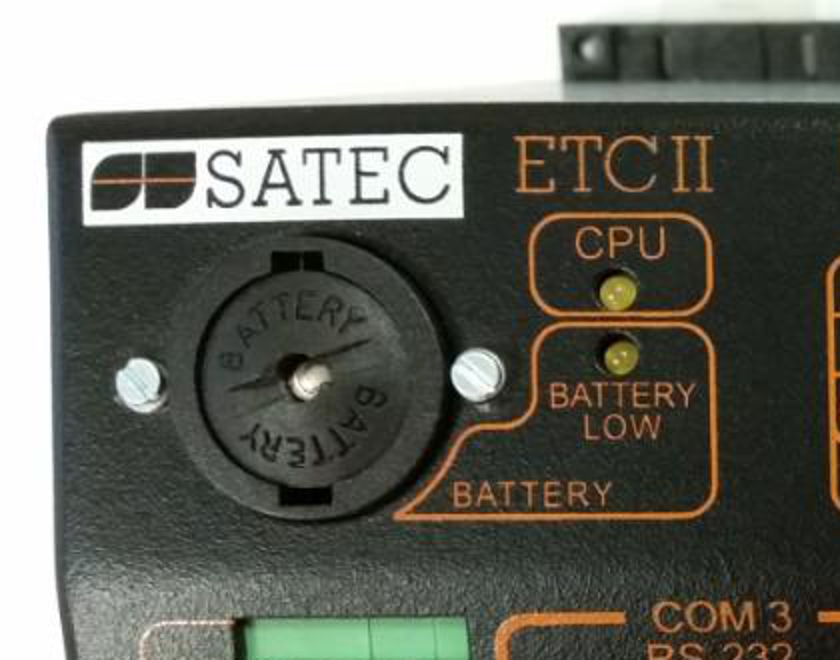
The ETC II Network Communicator has a backup battery in a round holder on its front panel, marked BATTERY. When the yellow BATTERY LOW light comes on, the manual says the battery is near the end of its operational life and should be replaced.
The manual's general warning is to turn off all incoming AC power and other power sources before any work on the instrument, and never to open the instrument while it is connected to a power source. Its battery chapter adds no ETC II-specific power-down steps, gives no cell type, and illustrates the replacement on the ETC2002, not the ETC II.
SATEC Australia has not published an ETC II battery replacement procedure. SATEC Australia's advice is to contact technical support before you change the battery.
What The Battery Backs Up
The manual describes 4 Mbyte of non-volatile memory with battery backup, used to store data and event files. The ETC II also has a real-time clock.
The manual does not say whether the configuration or the clock also depend on the battery, or what happens to any stored data while the battery is out.
Where To Find It
The holder sits at the top left of the front panel, beside the CPU and BATTERY LOW lights.
What The Manual Does And Does Not Cover
The manual's maintenance chapter refers to four photographs for the replacement and gives one caution: observe the battery polarity, which is marked on the inner part of the battery cover.
Those four photographs show the ETC2002, not the ETC II. Do not treat them as confirmed ETC II steps.
For the battery change itself, no ETC II source we have checked states:
- the battery type, size or voltage;
- any power-down step beyond the general warning above;
- whether the clock or stored data is kept while the battery is out, or for how long;
- how long the battery lasts or when to replace it routinely.
What To Do Now
SATEC Australia's advice: if the BATTERY LOW light is on, contact SATEC technical support through our contact form before changing the battery. Include the details from the product label and a photograph of the front panel showing the battery holder and the lights.
SATEC Australia will confirm what applies to your unit before any battery change.
Manuals And Source Pages
- ETC II Network Communicator Installation and Operation Manual, BG0594 Rev. A5: warning p. 3; features p. 6; front-panel lights p. 13; maintenance chapter pp. 53–54; specifications p. 58. https://satec-global.com.au/documentation/ETC-II-installation-operation-manual.pdf
Source review: 22 November 2026.