
EM720 · COMMUNICATIONS
Which EM720 communication document applies to your port
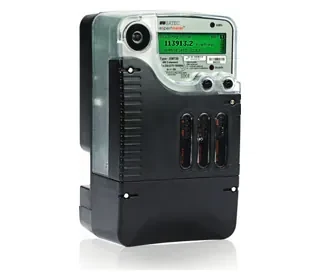
Which protocols an EM720 offers depends on the communication modules fitted, how each port is set up, the meter's firmware and, for IEC 61850, a licence. This page applies to the EM720 and EM720T. SATEC Australia's advice: start by recording the modules in the meter's expansion slots, then use this page to find the port, its protocols and the reference guide that applies.
The ports
The EM720 has one built-in optical infrared port. Its other ports come from plug-in modules.
| Port | Provided by | Protocols listed in the manufacturer's documents | Default in the operation manual |
|---|---|---|---|
| COM1, front infrared | Built in | IEC 62056-21, Modbus RTU/ASCII, DNP3 | IEC 62056-21, 19200 bps, 8 bits no parity |
| COM2, GSM/GPRS modem | GSM/GPRS module, slot 3 only | Modbus/TCP, DNP3/TCP | — |
| COM3, RS-232/RS-485 | A module with a serial port, such as the IRIG-B or Ethernet/USB module | Modbus RTU/ASCII, DNP3, IEC 62056-21 | Modbus RTU, 19200 bps, 8 bits no parity, RS-485 |
| Ethernet 10/100Base-T | Ethernet/USB module | Modbus/TCP (TCP port 502), DNP3/TCP (TCP port 20000), IEC 61850 with an IEC 61850 module and licence | IP address 192.168.0.203 |
| USB (mini-USB) | Ethernet/USB module, slot 1 or 2 | See below: the documents differ | — |
Some details need care:
- COM3: if more than one module with a serial port is fitted, only the port in the left-hand slot is enabled.
- Ethernet: the TCP servers support five simultaneous connections. The meter also has SNTP, eXpertPower and TCP notification clients.
- USB: the installation manual's introduction and the operation manual list USB as Modbus RTU only. The installation manual's specifications list Modbus RTU/ASCII and DNP3.0.
- GSM/GPRS: the installation manual's specifications list "Modbus RTU/TCP and DNP3.0/TCP" for this module, while its introduction and the operation manual say Modbus/TCP and DNP3/TCP.
- Interface type: the operation manual says the meter detects the port interface itself and it cannot be changed in setup.
- Optical head: the operation manual says the infrared port "can be equipped with an IEC- or ANSI-compatible optical head on your selection". The installation manual says the optical probe cable is not included.
Which guide to use
| Protocol | Reference guide | Revision on both SATEC sites |
|---|---|---|
| Modbus RTU, ASCII and Modbus/TCP | EM720 Modbus Communications Protocol Reference Guide | BG0457 Rev. A11, August 2023 |
| DNP3 and DNP3/TCP | EM720 DNP3 Communications Protocol Reference Guide | BG0458 Rev. A4, December 2019 |
| IEC 61850 | EM720 IEC 61850 Communications Protocol Reference Guide | BG0459 Rev. A4, May 2019 |
| IEC 62056-21 | EM720 IEC 62056-21 Communications Protocol Reference Guide | BG0460 Rev. A2, June 2010 |
The Australian and factory copies of each guide have the same revision and the same text. The EM720/EM720T Operation Manual BG0451 Rev. A4 covers port settings and refers to the EM720 Installation Manual BG0450 Rev. A6 for port wiring.
Some protocol details from the guides:
- DNP3: the guide says the EM720 implements Level 2 of the DNP3 protocol and does not support unsolicited requests or hardware collision avoidance.
- IEC 61850: the IEC 61850 guide (BG0459 Rev. A4, section 6.1) says: "A valid license key must be provided in the EM720 for IEC 61850 communications. The device is normally shipped with a temporary license, which is valid for a 30-day operation and then can be extended for an additional month. A permanent license can be obtained from your local distributor for an additional fee. A device serial number must be provided in the license request. The device may also be shipped with the permanent license in the event of a pre-paid fee." The Australian manuals page also offers the EM720 IEC 61850 ICD file.
- IEC 62056-21: the guide says the protocol runs on the optical port COM1, where it is the default, and on serial port COM3.
The GOST edition of the Modbus guide
The Australian site also carries a separate Modbus guide with GOST extensions, BG0475 Rev. A8 (December 2019). Its revision history ties it to firmware versions 26.X7.XX and, from Rev. A5, 26.X8.XX. Since Rev. A6 it covers GOST 32144-2013, although the Australian site's link text still names GOST 54149-2010. The main Modbus guide BG0457 does not mention GOST. SATEC Australia's advice: use the main Modbus guide BG0457, and contact SATEC Australia before using the GOST edition.
Firmware and guide revisions
Apart from the GOST edition, the guides do not say which firmware versions they apply to as a whole. Some individual entries do: the Modbus and DNP3 guides give a programmable number of energy decimals "with F/W 26.XX.28 and later", and the Modbus guide notes a feature "starting with V26.1.2". Each guide's revision history lists features added over time. The Modbus guide records additions up to Rev. A11 in August 2023. The operation manual BG0451 Rev. A4 carries no date of its own; its PDF file is dated 2015. The meter's firmware versions are shown on its Device Info display. SATEC Australia's advice: record them, and check with SATEC Australia before relying on a register or object that matters to your project.
Before you change a port
The operation manual notes that changing network settings through the Ethernet port restarts the port, so communication is lost for a time. It also says: "When a new module is installed, or either Ethernet or GPRS network parameters are changed, the meter logs out of the network so the IP address you might use for connecting to the meter will no longer be effective." The serial port settings, MAC address and IP address are shown on the Device Info display.
What to send SATEC Australia
SATEC Australia's advice: for a communication question, include the modules fitted in slots 1, 2 and 3, the port and protocol you are using, the port settings from the Device Info display, the meter's firmware versions, and for IEC 61850 whether the licence is temporary or permanent.
Contact SATEC Australia technical support through our contact form.
Source review: 22 November 2026.