
BFM-II · IDENTIFY
What to record on a new BFM-II before commissioning
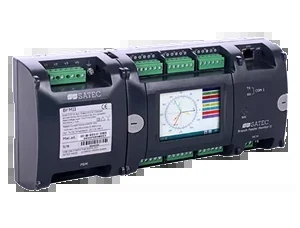
The BFM-II is a modular meter: a main control module, optional current input modules and other plug-in modules, with current sensors ordered by type. SATEC Australia's advice: record the items below before you wire or configure anything, because the right wiring drawing, CT setting and capacity depend on what was supplied.
This page covers the standard BFM-II energy meter described in the BFM II EM and DFR Operation and Installation Manual, BG0588 Rev. A12. It does not cover the BFM-II DFR or the BFM136.
1. The device label
The manual's sample labels show:
- the model, "BFMII";
- an accuracy standard and class;
- the rated voltage;
- the rated current input, marked "(HACS 100)" or "(RS5)";
- the MAC address ("Mac. Ad.") and the serial number ("S/N").
The DFR variant's label reads "BFMII DFR".
SATEC Australia's advice: photograph the label and record each of these fields as printed on your unit.
2. The modules and where they sit
The manual's assembly drawing notes: "PSM, CIM6 and CIM18 modules assembled at the MCM left side only" and "Communication, I/O and Aux Power supply modules assembled at the MCM right side only". The PSM is the power supply and voltage inputs module; the MCM is the main control module.
| Item | What the sources say |
|---|---|
| Current input modules | CIM6 or CIM18; at most two per device. Each is ordered for HACS, RS5 or FLEX sensors |
| Voltage Input Module (VIM) | One per device; no more than one CIM when the VIM is used |
| Other options | 4G modem; digital input, relay output and analogue input modules |
| Display | Ordered as a Detachable Graphic Display Module or a blank panel |
The SATEC Australia datasheet's module codes include, for example, C6H-BFM II (6 current input module, HACS version), C18R-BFM II (18 current input module, RS5 version) and VIM50Hz.
SATEC Australia's advice: record every module fitted, its position, and its code from the order or packing list if you have it. See which BFM-II module combination fits my circuits.
3. The current sensors
The manual says: "USE ONLY WITH SUPPLIED BFM CURRENT TRANSFORMERS!"
- Sensor types. The manual describes HACS sensors able to connect "a variety of different HACS current rating: 100A-3000A/40mA", and RS5 as a "remote sensor 20A/5mA (Split core CT 5A nominal) to be connected as second external CT in Medium/High Voltage applications".
- Polarity colours. Solid-core HACS secondary: + red, − orange. Split-core HACS and RS5 secondary: + white, − black.
- Labels. "HACS/RS5 stickers I1 through I54 correspond to the BFM II current inputs with matching labels. Cable stickers 1 through 18 correspond to the BFM II current terminal blocks with matching labels." Appendix B has a template for recording each sub-consumer's input number, wire colour, cable number and phase.
SATEC Australia's advice: record the type and rating of every sensor, and for RS5 the ratio of the CT it is connected to.
4. The backup battery
The manual says: "The BFM II is packed without battery; therefore it must be installed by the installer during the BFM II installation." See replacing the BFM-II backup battery.
5. Firmware
The manual lists these firmware references "to check your device's options":
| Firmware | Manual's description |
|---|---|
| V37.1.XX | Energy Meter, up to 54 1Ph and 18 3Ph sub-meters |
| V37.2.XX | Energy Meter and Digital Fault Recorder, up to 12 3Ph sub-meters |
| V37.3.XX | Add VIM and BACNet support. Performance improvement |
| V37.4.XX | Add 4G support |
SATEC Australia's advice: record the firmware version as well as the fitted modules. A firmware reference alone doesn't show which modules are fitted.
6. Before you change anything
The manual says the factory default is 6 three-phase submeters at base address 1, and gives different figures elsewhere in the same manual. SATEC Australia's advice: read and save the existing setup in PAS before you change anything.
The manual gives the factory default passwords (BG0588 p40) and says "It is highly recommended that you change the factory set passwords as fast as possible." SATEC Australia's advice: change the default passwords during commissioning and record them securely.
What to send if you need help
SATEC Australia's advice: send us the label photo, the serial number, a photo showing every module, the sensor types and ratings, the firmware version and your site's circuit list. Contact us through our contact form.
Source review: 22 November 2026.