
BFM-II · BATTERY
Replacing the BFM-II backup battery
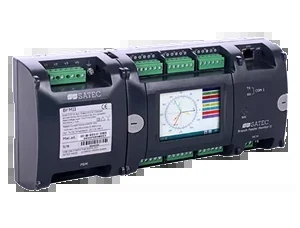
The BFM-II keeps its clock running on a small lithium coin cell when the main power is off. It ships without that cell fitted, so it goes in during installation, and the meter tells you when it is running low. This article covers what the battery does, how the meter reports a low battery, and the manufacturer's procedure for fitting or replacing it.
It applies to the BFM-II branch feeder monitor as described in SATEC's BFM II EM and DFR Operation and Installation Manual, BG0588 Rev. A12 (July 2024).
What the battery does
The manual says the backup lithium battery "keeps the meter clock running when the meter goes to standby after the main power is OFF". It describes the battery as a clock backup. The manual's feature list says the internal clock keeps running for up to two years without external power. It does not give a battery service life or a replacement interval; instead, the meter reports a low battery as described below.
How the meter tells you the battery is low
When the battery level drops below the minimum allowed threshold, the BFM-II:
- sets a "BATTERY LOW" flag;
- records an event in its Event Log; and
- shows diagnostic code 13, "Low battery", which the manual describes as "Low lithium battery … Battery check or replacement is required".
You can inspect the device diagnostics in PAS or on the display. Diagnostic events are also kept in the Event Log, which PAS can retrieve.
If the clock time has been lost, the meter shows diagnostic code 11, "RTC fault". The manual says this clears automatically once the clock is updated.
Before you start
- Battery: the manual specifies a CR2450 lithium 3.0 V cell.
- Tool: a Phillips screwdriver.
- Who: the manual says "Only qualified personnel familiar with the instrument and its associated electrical equipment must perform setup procedures."
- Isolate the meter. The manual's battery section says the battery can be replaced with the BFM-II power off. Its general warning goes further: make sure "all incoming AC power and other power sources are turned OFF before performing any work on the instrument", and never open the instrument while it is connected to a power source.
- Allow for the 30-minute window. The manual says that once the BFM-II power supply is turned off, the battery can be replaced within the next 30 minutes "without losing any data". It also says the data may be uploaded to a PC with PAS to avoid losing data. It does not say which data would be at risk after 30 minutes. SATEC Australia's advice: upload the logs you need with PAS before you switch off, and plan the job so it is finished inside that window.
- Sealed terminal covers. The BFM-II's clear terminal covers can be sealed with a security seal cable lock, and the first step below removes the lower cover. SATEC Australia's advice: if the covers are sealed, contact the seal owner and SATEC Australia before you remove them.
Replacing the battery
These are the manufacturer's steps from section 2.6 of the manual. The manual's photographs show a BFM-II fitted with the display module (GDM).
- Remove the lower terminal cover of the main control module (MCM).
- Undo the GDM's fixing screw with a Phillips screwdriver, then pull the GDM away to reach the battery holder behind it.
- Remove the old battery and insert the new one with the positive (+) side on top.
The BFM-II can also be ordered with a blank panel in place of the display module. The manual's procedure does not describe that arrangement. SATEC Australia's advice: if your BFM-II has a blank panel, or your unit does not match the manual's steps, contact SATEC Australia before you go further.
After the change
- Expect a slower start. The manual says that the first time the power supply is turned on after a battery is installed, initialisation may take about 7 minutes, against the usual 40 seconds. The green CPU LED flashes while the BFM-II is initialising.
- Check the clock. If diagnostic code 11 appears, or the time is wrong, set the clock. You can do this in PAS (Monitor > RTC) or with Time Adjustment on the display.
- Check the diagnostics. SATEC Australia's advice: once the BFM-II is running, check its diagnostics and Event Log in PAS or on the display, and confirm that code 13 is no longer shown.
Warranty
The manual's limited warranty is on a return-to-factory basis. It says that "Only a duly authorized representative of the manufacturer may open your instrument", and that the unit should only be opened in a fully anti-static environment.
SATEC Australia's advice: if you are unsure whether battery work on your BFM-II is covered, contact SATEC Australia with the meter's serial number before you start, through our contact form.
Other SATEC meters
This procedure is for the BFM-II only. Do not apply it to other SATEC meters, including the BFM136 branch feeder monitor, which is a separate product. Use the manual for your exact model.
Source review: 22 November 2026.