
BFM · IDENTIFY
How do I tell a BFM-II DFR, a standard BFM-II and a BFM136 apart?
SATEC has three branch feeder monitors with similar names: the BFM-II Digital Fault Recorder (DFR), the standard BFM-II, and the BFM136. The BFM-II and the DFR share one manual, BG0588 Rev. A12. The BFM136 has its own manual, BG0394 Rev. A11, and its log capacities differ from the BFM-II's.
SATEC Australia's advice: identify the exact product before you use any setting, log list or procedure from a manual.
Quick comparison
| BFM-II DFR | Standard BFM-II | BFM136 | |
|---|---|---|---|
| Manual | BG0588 Rev. A12 | BG0588 Rev. A12 | BG0394 Rev. A11 |
| Label heading in the manual's label figures | "BFMII DFR" (Figure 1-2) | "BFMII" (Figure 1-1) | Figure 1-1a has no model heading; Figure 1-1b reads "BFM136" and is captioned "DFR label" |
| Firmware reference in the manual | "V37.2.XX – Energy Meter and Digital Fault Recorder, up to 12 3Ph sub-meters" | "V37.1.XX – Energy Meter, up to 54 1Ph and 18 3Ph sub-meters" | Feature-list footnotes "From Firmware version 18.4.1" and "From Firmware version 18.5.1" |
| Display in the manual | "Easy to use color graphical LCD display with backlight and Touch Panel (optional)" | Same manual and wording | "an LCD display and four push buttons" |
| Fault recorder in the manual | "BFMII DFR: Digital Fault Recorder" in the feature list | The feature list names the fault recorder for the "BFMII DFR" | Not described in BG0394 Rev. A11 |
| Protocols in the manual's port specifications | Modbus RTU/ASCII, Modbus TCP, DNP 3.0 and DNP 3.0/TCP | Same manual | Modbus RTU/ASCII and Modbus TCP |
The BFM-II manual also lists "V37.3.XX – Add VIM and BACNet support. Performance improvement" and "V37.4.XX – Add 4G support". It does not say whether these apply to the DFR.
The BFM-II manual's Ethernet port section also names an IEC 60870-5-104 server, which its port specifications do not list. SATEC Australia's advice: check the protocol guide that matches your model and firmware before relying on any protocol.
1. Read the label
The label figures in the two manuals carry different headings.
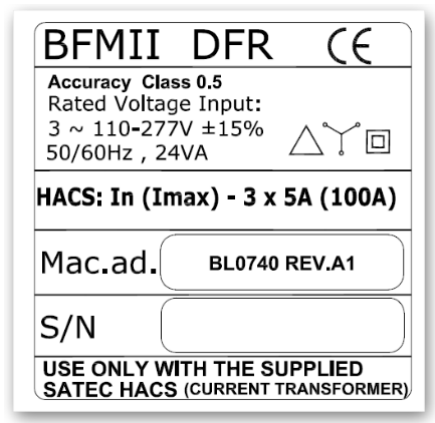
SATEC Australia's advice: photograph the whole label, including the serial number and any revision code printed on it.
2. Check the firmware version
The BFM-II manual says: "Use the following firmware references to check your device's options".
On a BFM136, the manual's service display table lists "Device serial number" on page 2, and "Software version" and "Boot loader version" on page 3.
SATEC Australia's advice: record the full firmware version you find, and do not assume features from a version family alone.
3. Check the recorder setup in PAS
BG0588 describes configuring the fault recorder under Meter Setup → Memory/Log → Fault Recorder. Its section 4.11.1 is headed "DFR Data Recorders" and says "For DFR there are additional files per SM": three general-purpose data logs, Log 13 (fault trend data), the Fault log and the WF log. The BFM136 manual does not describe a fault or waveform recorder.
SATEC Australia's advice: if PAS shows these recorders for a BFM-II, confirm that it is a DFR from the label and firmware version.
The existing article How do I address multiple BFM meters on RS-485 or Ethernet? covers addressing for both the BFM136 and the BFM-II.
4. Confirm the current inputs
The BFM-II manual lists sizes from "BFM II 18 – Main Control Module (MCM) with 18 current measurement channels - BFM-218" to "BFM II 54 – MCM with 54 current measurement channels (Main + 2 x CIM18) - BFM-254". The BFM136 manual says "up to 36 single-phase or 18 two-phase or 12 three-phase submeters in a single device", "up to a total of 36 current inputs".
SATEC Australia's advice: for a DFR, confirm the number of current inputs and feeders from the order code, the current-input modules fitted and the site drawings. Do not take it from the standard BFM-II sizes or from another site.
Replacing a BFM136 with a BFM-II
The BFM-II manual has a table titled "Upgrading BFM136 to BFM II (236)". It says "the channels numbering differ from the BFM 136". The table has "BFM 136" and "BFM II 236" columns for "Input #", "Wire Color", "Cable #" and "Phase", against each "Sub-consumer".
SATEC Australia's advice: before replacing a BFM136, record its channel assignments and retrieve its logs, then fill in that table, so that every circuit keeps its identity on the new device.
Need help identifying a unit?
SATEC Australia's advice: send SATEC Australia a photograph of the label, the firmware version, and the order code if you have it. Contact SATEC Australia technical support through our contact form.
Source review: 22 November 2026.