
PM130 PLUS · TOU MODULE
Can I replace the clock battery in a PM130 PLUS TOU module?
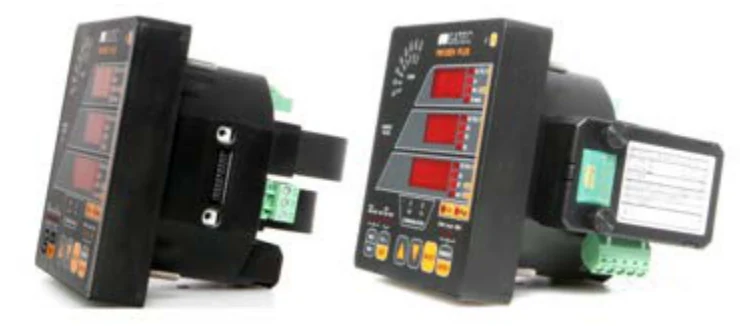
Quick answer
Only a PM130 PLUS fitted with the optional TOU module has a clock battery. The manual describes changing the module's CR1632 cell, but SATEC Australia hasn't published those steps: they leave out the power state, reassembly and any clock check, and the polarity wording is unclear. The manual also says only an authorised representative of the manufacturer may open the instrument, and does not say whether that covers the module case. SATEC Australia's advice: contact SATEC Australia technical support before opening the TOU module.
Applies to
The PM130P, PM130E and PM130EH PLUS fitted with the optional TOU module, which the datasheets call the TOU+4DI module. A PM130 PLUS without the module has a clock with no battery backup, so there is no battery to replace.
This article does not cover the PM135. The manual does not say which hardware revisions or firmware versions the battery section applies to.
What the TOU module's battery does
The TOU module adds a battery-backed real-time clock and four digital inputs to the meter. Without it, the meter clock keeps time for only seconds after supply is lost: the manual gives 20 seconds in one place and a typical 30 seconds in another.
The manual recommends the TOU module when you use time-scheduled tariff rates. Without it, a long power outage may cause the meter clock to lose time, so the tariff registers would no longer follow the calendar schedule.
How long the clock keeps time
The manual gives two different figures for the TOU module clock: a 6-year retention time in the options section, and a typical retention time of 36 months in the technical specifications. The datasheets give 36 months. Neither figure is described as the life of the cell. We don't treat either as a battery replacement interval, and the manual gives none.
How to tell the clock has a problem
- Watch the diagnostic LED. The "i" LED flashes when the meter has recorded a diagnostic message.
- Read the diagnostic codes. Use the diagnostics page on the front display, or in PAS select Device Control from the Monitor menu and open the Device Diagnostics tab. Code 11 (rtc) means the clock time has been lost. Code 13 (Lo.bAt) means low battery on a meter with a battery backup unit, and the manual says battery replacement is required.
- Check the time. Use the rtc menu on the front display, or in PAS select RTC from the Monitor menu.
- Reset the clock if it is wrong. In the PAS RTC window, click Set to synchronise the meter with the PC clock. If the meter is protected by a communications password, you may need it for PAS to update the clock. A reset clock does not show that the cell is healthy.
What the manual says about replacing the cell
The manual describes replacing a CR1632 cell in the TOU module, on pages 42–43. Its battery section warns that only qualified personnel familiar with the instrument and its associated electrical equipment must carry out the replacement.
SATEC Australia hasn't published those steps, because the power state, the polarity wording and the refit and clock steps aren't settled.
What the manual leaves unclear
- Power state. The manual's battery steps don't say whether the meter must be switched off. Elsewhere the manual says to turn off all incoming AC power and other power sources before any work on the instrument, and never to open it while it is connected to a power source. The I/O connections section, which includes the TOU module, says to shut off all incoming power sources before installing an I/O module. Our reading is that those warnings apply to removing the TOU module for a battery change.
- Who may open it. The warranty is on a return-to-factory basis and says only a duly authorised representative of the manufacturer may open the instrument, in a fully anti-static environment. The manual doesn't say whether the TOU module case counts.
- Polarity. The manual's text says the positive pole goes "toward the battery holder". The figure is marked "+ On the top". We won't give an orientation from that wording.
- Afterwards. The manual's steps end once the cell is fitted. They don't cover closing the case, refitting the module or checking the clock. The manual doesn't say what happens to the clock, tariff registers or logs while the module is out.
SATEC Australia's advice: contact SATEC Australia technical support before opening the TOU module case. After the module has been out, or after a code 11 or 13, set the clock and check the diagnostics before relying on the tariff registers.
Contact SATEC Australia technical support
Contact SATEC Australia technical support through our contact form. Give the meter model and order code from its label, whether a TOU module is fitted, the diagnostic codes and the date you noticed the problem.
Manuals and source pages
- PM130 PLUS Powermeter Series PM130P/PM130E/PM130EH Installation and Operation Manual, BG0425 Rev. A22:
- Warranty, page 2. Safety warning, page 3.
- Features (real-time clock), page 14. Available options and section 1.2.4 TOU module, pages 15–16.
- Section 2.6 I/O Connections warning, page 37. Section 2.6.5 TOU module and TOU battery replacement, page 42; Figure 2-31, page 43.
- Section 5.4 Configuring Billing/TOU, page 106.
- Section 6.2 Updating the Meter Clock, page 121. Section 6.3 Viewing and Clearing Device Diagnostics, page 122. Upload scheduler, page 138.
- Appendix A.9 Real-time Clock, page 150. Appendix G Device Diagnostic Codes, page 172.
- Printed and PDF page numbers are the same in this manual.
- Available from the SATEC Australia manuals and datasheets page. Evidence checked 22 November 2026.
Source review: 22 November 2026.