
EM720 · BATTERIES
The two batteries in the EM720
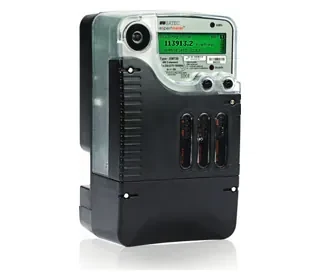
The EM720 power quality and revenue meter carries two different batteries. A small lithium cell keeps the meter's clock running; the manuals differ on what else it protects. A separate rechargeable battery pack, ordered as an option, keeps the whole meter running through an outage. This article sets out what the manufacturer's manuals say about each one, what to watch for, and why SATEC Australia does not give a do-it-yourself replacement procedure.
The lithium memory backup battery
The installation manual (BG0450 Rev. A6) calls this the memory backup lithium battery. It specifies an AA lithium 3.6 V cell. The specifications list it as a "Field replaceable Lithium battery" for real-time clock backup, with "More than 10 years service battery life" and "> 3 consecutive years" against IEC 61038. Elsewhere in the same specifications, the manual gives "RTC backup data retention" as 5 years.
The manuals do not agree on everything this cell protects:
- The operation manual (BG0451 Rev. A4) says it "keeps the meter clock running when the meter goes to standby after the auxiliary battery is discharged".
- The datasheet says it backs up the clock, setup and data logging information.
- The installation manual warns: "If you replace the battery while power is off, you will lose all data currently stored in the memory."
- The same installation manual's specifications describe the log memory as "Non Volatile Memory (20years Data retention)".
The manuals do not reconcile these statements.
How you know the lithium battery is low
When the cell's voltage drops below its minimum, the meter's display shows a low-battery icon. The operation manual describes it as a blinking "Battery Low" icon, shown ahead of other diagnostic indicators. The battery status, replacement date and operation time are also shown on the meter's Device Info display.
SATEC Australia's advice: if the low-battery icon appears, contact SATEC Australia with the meter's serial number, and keep the meter on supply while you do. The installation manual links loss of stored data to the cell being changed with the power off.
What the installation manual describes, and why SATEC Australia doesn't give steps
Chapter 4 of the installation manual describes removing the sealed screws on the front covers, opening the battery housing cover with a flat screwdriver, and fitting a new cell. Before changing the cell, it says to upload the meter's data to a PC with PAS, or to change the cell with the power on.
That chapter sits alongside other statements in the same manuals that it does not reconcile:
- The installation manual's precautions say to ensure all incoming AC power and other power sources are turned OFF before performing any work on the instrument, and "DO NOT open the instrument under any circumstances". The operation manual says not to open the instrument "when it is connected to a power source".
- The warranty says "Only a duly authorized representative of the manufacturer may open your instrument", and the warranty is on a return-to-factory basis.
- The text says to fit the cell "with the plus towards the outside", while the figures say the "(+) is on the top".
- For the PAS upload, the chapter refers to "EM720 Operation Manual, Chapter 12". The operation manual (BG0451 Rev. A4) has no Chapter 12.
- The front-cover screws are sealed. The manual does not say what removing them means for the meter's seals.
SATEC Australia's advice: do not remove the sealed screws or open the meter to change either battery yourself. Contact SATEC Australia with the meter's serial number.
The rechargeable backup battery pack
The Battery Pack Backup Power Supply (BPS) keeps the meter running from its own battery when the supply is lost, so it can keep recording dips and interruptions. It is an ordering option, so not every EM720 has one. A meter can instead be fitted with an auxiliary power supply module, which the installation manual says works without the BPS.
The manufacturer's documents describe the pack differently:
| Document | Battery type | Backup time |
|---|---|---|
| Installation manual BG0450 Rev. A6, specifications | Rechargeable NiMH | 2.5 hours |
| EM720 datasheet, and SATEC Australia's current EM720 datasheet | Rechargeable Li-ion | Up to 6 hours |
| EM720 brochure | NiMH rechargeable | Up to 2.5 hours; the ordering option says "up to 6 hours" |
| Operation manual BG0451 Rev. A4 | Li-Ion | More than 7 hours |
The installation manual's feature list also calls it a "Lithium Metal rechargeable backup power supply unit". None of the documents says which description applies to which meter or production period. Backup time is how long a charged pack runs the meter. It is not the pack's service life, which no document states.
The installation manual says the pack is charged for 16 consecutive hours before the meter is installed. The operation manual says the pack's voltage is about 8.2 V at full charge, and that if it falls below that, the battery should be checked. The pack's status and voltage are shown on the Device Info display. The meter's display backlight does not work while the meter is running from the battery with no voltage on its terminals.
No manufacturer document gives a procedure, part number or interval for replacing the pack.
SATEC Australia's advice: contact SATEC Australia about the pack's condition or replacement.
Contact SATEC Australia
Contact SATEC Australia technical support through our contact form. Have the meter's serial number ready.
Source review: 22 November 2026.